Benetic.
B2B solution for retirement professionals
Overview
Benetic aims to revolutionise the retirements benefit market, providing a one-stop solution for Recordkeepers and Advisors in the management and sale of investment funds for retirement.
As Head of User experience my role revolved around understanding the business, crucially the users and developing a user experience and design system that would be usable and scalable.
Role
Head of User Experience
Highlights
Established design system and user research framework for B2B financial platform
Problem
From a user experience perspective one of the key initial challenges was to better understand the industry. Key stakeholders in the internal team and across the customer based were experts in the retirement field and used a range of theories and terminologies that provided a steep learning curve as a UX consultant with limited knowledge of the industry.
In terms of design the main challenges were providing an interface that was usable while still speaking effectively to the niche audience. The presentation of large amounts of data in a way that made sense to the user. For instance allowing advisors to search and select funds and the presentation of record keepers in a manner that allowed them to be filtered, compared and contrasted.
Strategy
As Head of User Experience I led the vision and execution for user research, UX Design and ultimately managing the evolving design system used across the user interface of the application.
Work was carried out in sprints, working closely with key internal stakeholders to plan and execute complex product visions at a fast pace while ensuring regular research and testing with external stakeholders and preparing regular pitch documentation to support pushes for additional funding.
Requirements Gathering & User Journey Mapping
Sprints would start with requirements gathering, often involving the intended product audience and utilising Miro to consider their pain-points and establish how an A to B process might work to effectively fulfil their objectives.
This would start at a high level with a simple sketch and then be refined through UX design to draft wireframes fulfilling the journey. I found once a UI pattern had been established it was in this case more effective to wireframe as much as possible using UI elements rather than the traditional skeleton style of wireframe. Both internal and external audiences engaged more effectively with this process and there were no hang-ups around UI design derailing the conversation.
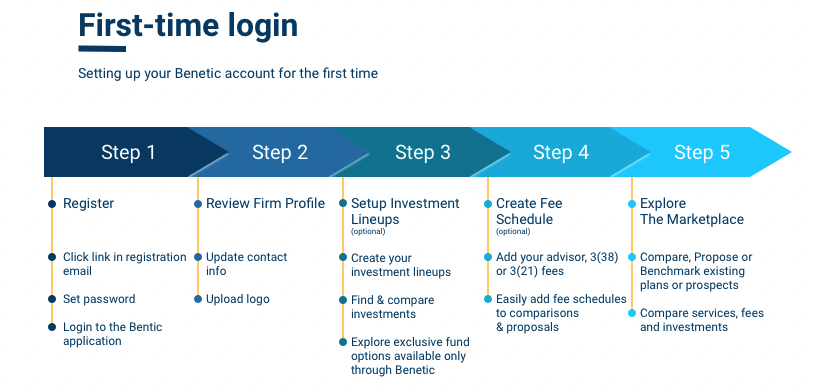
User journey maps were developed at a high level, broken into sprint segments. As an additional benefit the structure of the journey maps were later developed into online user guides.
Wireframing
I am an advocate of skeleton wireframes and not distracting the audience with UI elements, but sometimes, particularly when working with a non-technical audience engagement is just difficult without look and feel. I established a UI framework early in the project and found it quick and efficient to put together hybrid wireframes with a little higher level of detail and use of UI elements.
These are not pixel perfect but provide realism that team members, customers and potential investors engaged with well. I use Axure RP when possible, I love the layout and I am efficient working with it. However, for UI elements I do see the value in Figma, particularly for working with developers and communicating the properties of elements, so I moved the UI library into Figma.
Prototyping
Clickable prototypes became a key tool very quickly, utilising Invision and Axure RP for presentations to potential clients and potential investors. The ability to showcase what the system could accomplish through UI before the development was complete was fundamental to validating ideas and highlighting areas of improvements.
Dependent on the audience and the need this might be a simple slide through carousel of UI elements hosted in Invision, or more likely a more detailed click through with Axure RP utilising states, animations and text entry from the login screen onwards.
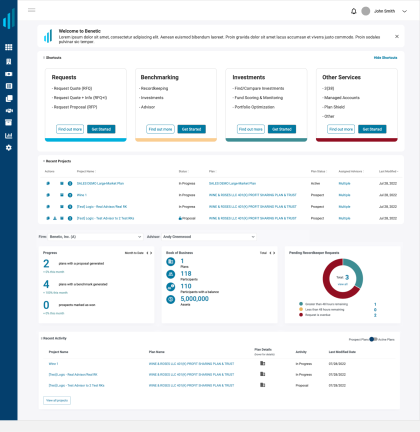
Tiles were used on the dashboard and across the platform when selection options were available to provide clear customer journeys.
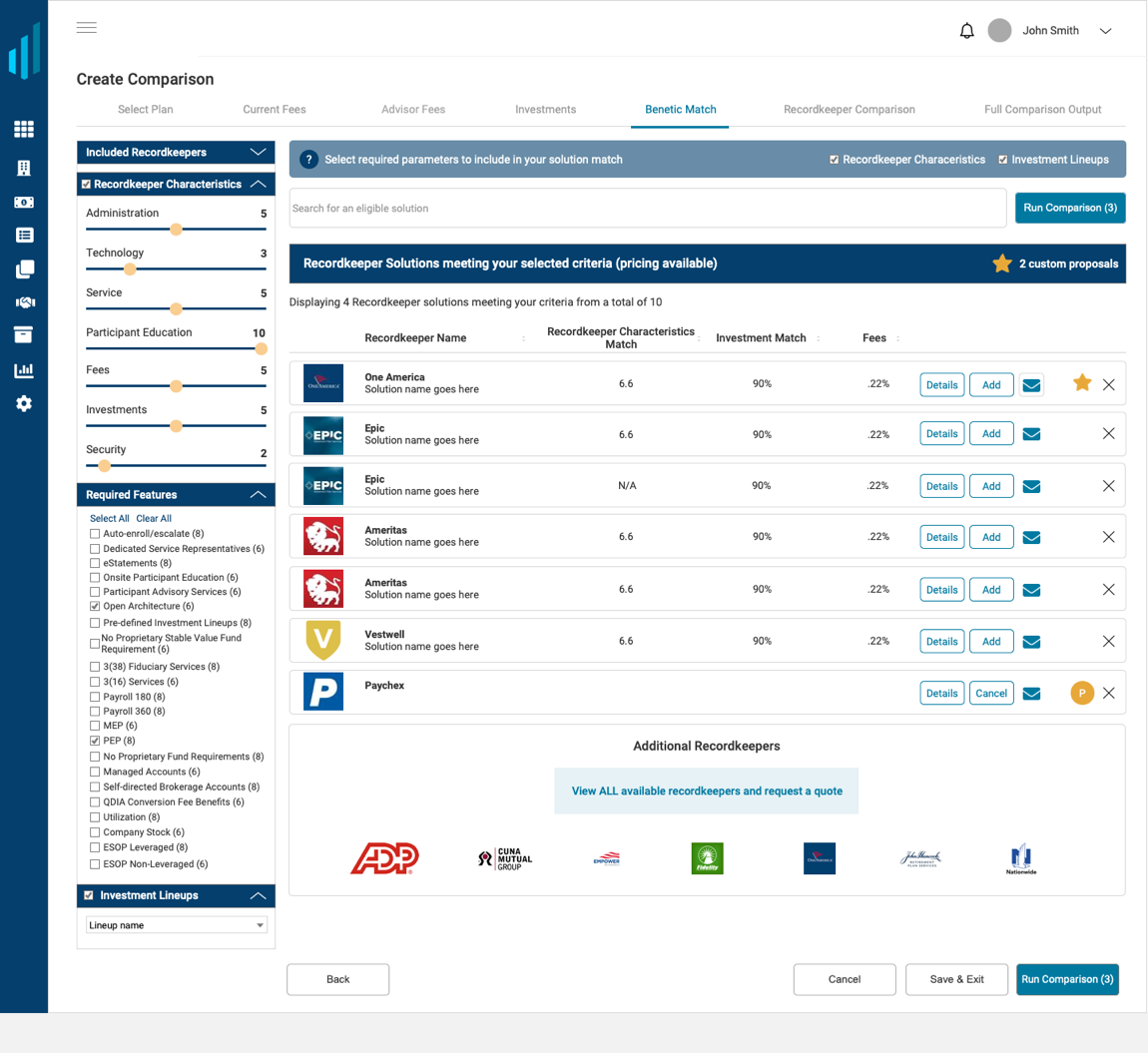
In a lot of places options needed to be presented to customers in a comparable manner, I used rows rather than cards in this case to display many results with column sorting and filtering allowing drilling down of results.
UI Design
We worked in a small team were product management were experts in their industry, but not in the web design world.
I noticed quickly suggestions and feedback for product design would vary day to day and inspiration was coming from all manner of resources.
I pushed for a design system early in the project and defended this as a matter of importance for maintaining consistency and usability across the platform. It also worked well as an educational tool with stakeholders understanding quickly when a radio button or dropdown should be used for instance, making requirements gathering conversations more efficient as the project progressed.
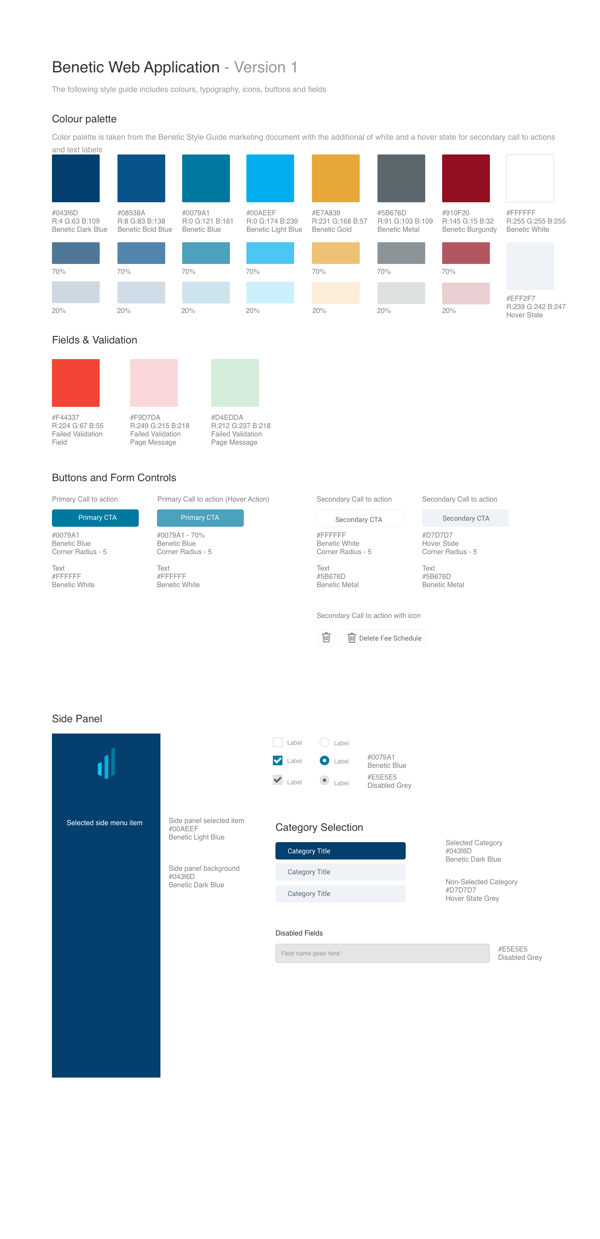
UI design system, originally held in Axure RP and Sketch, but migrated to Figma to allow the development team to easily fetch characteristics.
Inspiration for Future Projects
I try to reflect on the positives and negatives of each project and build this into future engagements to ensure continuous improvement. Here are some areas I'll be looking to improve in the future.
01 - More structured user research
Opportunities were driven by the availability and interest of potential customers. I would like to have a more rounded selection of participants.
02 - Better management of the UI system
We moved to Figma for management of the UI pattern library and this helped efficiency with development. I would do this straight away in future.
03 - Axure RP for prototyping for more realism
Elements such as text entry which add realism are not available in Figma, Invision etc. so I will push for Axure if more detailed user testing is required.